
Event logs
Event logs
The Event logs dataset provides visibility into all tracked changes and events occurring in LogAlto. It is designed to help users audit modifications, understand data evolution, and analyze user activity across projects, indicators, reports, and custom forms.
Access to this dataset is restricted: only profiles with the MANAGE-EVENT-LOGS permission can view and use the Event logs dataset in Analytics.
Change logs available in Analytics
The Event logs dataset includes the following change logs:
- Indicators: changes made to indicator configurations and values
- Projects overview: project-level updates and actions
- Custom forms: changes to custom forms, and custom form records
These logs ensure full traceability of changes, including the event date and the user who performed the action.
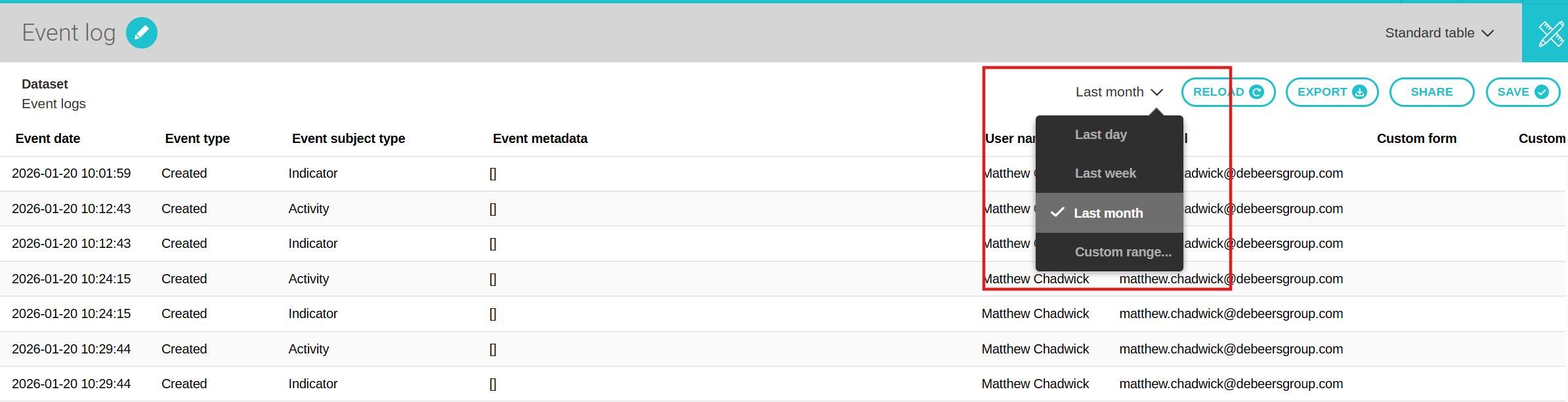
It is important to note that this dataset must include a filter on the event date (Last day, Last week, Last month, Custom range), and the maximum number of days that can be displayed is 31.
Available fields
-
Event date
The exact date and time when the event occurred. This field allows users to understand when a specific action was performed in the system.
-
Event type
The category of action that was performed (e.g., created, updated, deleted). It helps identify what kind of change or activity took place.
Example: Each time a value is entered into an indicator, it generates a new event type called “created.” If a value is updated, then it will be marked as “updated.”
-
Event subject type
The type of object affected by the event (e.g., project, activity, indicator, custom form). This clarifies which entity the action was performed on.
-
Event metadata
Additional contextual information related to the event. It may include details such as previous and new values, system-generated data, or technical attributes.
-
User name
The full name of the user who triggered the event. This helps track accountability and user activity.
-
User email
The email address of the user who performed the action. Useful for precise identification, especially when multiple users have similar names.
-
Project (with URL)
The project associated with the event, including a direct link to access it. This allows users to quickly navigate to the related project.
-
Activity (with URL)
The activity related to the event, including a direct link. It provides quick access to the specific activity impacted.
-
Indicator (with URL)
The indicator involved in the event, with a direct link to its page. This helps users review performance or data changes.
-
Custom form (with URL)
The custom form connected to the event, including a direct link to its configuration. This is useful when tracking structural or submission-related changes.
-
Custom form record (with URL)
The specific form entry affected by the event, with a direct link. This allows users to access the exact record that was created or modified.
Available filters
- Event date (quick filter)
- Event type
- Event subject type
- User
- Project
- Activity
- Indicator
- Custom form
Reports created from this dataset cannot be added to dashboards.